Inspect unfamiliar spaces with more confidence.
Findy helps you carry out a guided privacy inspection using camera-assisted checks, Bluetooth discovery, local-network scanning and your iPhone's sensors.
- No account or sign-up
- No analytics or tracking SDKs
- Scan results stay on your device

Peace of mind before you settle in
You have five minutes in a new room and a nagging question. Findy turns that uncertainty into a calm, methodical check — so you can unpack and relax.
Real methods, not theatre
Camera-lens reflection, infrared viewing, network scanning, Bluetooth and magnetic checks — each one does something a phone can genuinely do. No invented "AI room scan", no fake radar.
Ready in seconds
Open the app, pick a check, and go. No setup, no account, nothing to configure — it is built for the moment you walk into an unfamiliar room.
Private by design
No sign-up, no analytics, no tracking. Your scans stay on your device. A privacy tool that quietly respects your privacy is the only kind worth trusting.
Five ways to inspect a room
Findy combines several inspection techniques, because each one is suited to spotting something different.
Guided visual inspection
A checklist of the objects worth examining first: smoke detectors, chargers, clocks, vents, mirrors and decorative objects. The most reliable method is still your own eyes.
Camera-assisted inspection
Use the iPhone camera to look for lens reflections and possible infrared light sources in low light — sources that are easy to miss unaided.
Local-network discovery
Review devices reachable on the Wi-Fi you are connected to, and see which expose the ports and services that IP cameras and recorders commonly use.
Bluetooth discovery
List nearby Bluetooth devices that are advertising, with an estimated distance and direction derived from signal strength.
Sensor-assisted checks
Use the iPhone magnetometer to investigate unusual magnetic readings around one specific physical object.
Findy shows you the reason behind every result, so what you find is something you can actually act on.
How an inspection goes
Three steps. The app assists the middle one; your eyes do the rest.
Follow the checklist
Work through the room in order — the objects with power and a sightline first.
Run the relevant checks
Camera, network, Bluetooth or magnetic — whichever fits the object in front of you.
Inspect the object
Findy points you at what to look at. The judgement — and a closer look — stay with you.
Where people reach for Findy
Any time you are somewhere unfamiliar and want to look before you relax.
Hotels & motels
A quick sweep of the room you have just checked into — the alarm clock facing the bed, the smoke detector, the TV — before you unpack.
Short-term rentals
You are usually on the host's own network, so the device scan has the most to work with here. Look before you settle in for the week.
Changing rooms & fittings
The camera checks travel in your pocket — a discreet look at mirrors, vents and fittings wherever you need a moment of privacy.
Your own home
See what is actually on your Wi-Fi, and get an alert when an unfamiliar device joins a network you have scanned before.
Offices & meeting rooms
A calm pre-meeting check of an unfamiliar room, using the checks you are authorised to run on a network you are allowed to use.
Travelling light
No extra gadget to pack. The tools that would otherwise need dedicated hardware live in the phone already in your hand.
Results you can interpret
Findy tells you what it actually observed and why something was flagged, so you can decide what to do next.
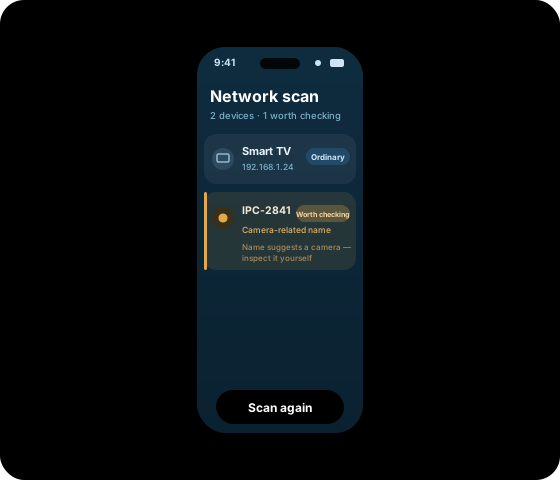
What a useful result looks like
Shows camera-related indicators
Findy shows the reason it marked the device:
- "Name matches <keyword>" — the device name contains a camera-related term
- "Streaming/surveillance service" — it advertises a video service on the network
- An open port associated with cameras, or a first appearance since your last scan
One reason is shown, not a score. How to read a result.
The reason behind every result
Findy shows you the evidence it observed — the matching name, the open port, the service a device advertises — so you can see exactly what prompted each result and stay in control of the conclusion.
Built for people checking real rooms
Available on iPhone and iPad
Requires iOS or iPadOS 16.6 or later. Free to download, with an optional subscription for the camera and network tools.
Updated regularly
Detection methods, wording and result labels change as we test them. Every release is listed in the changelog.
Testing published openly
We document how we evaluate Findy and publish our testing methodology openly. See the methodology.
A calm check in about a minute
You do not need to be an expert. A first pass takes roughly the time it takes to set your bag down.
Glance through the lens
Point the camera at the smoke detector, the clock and the mirror. A small bright reflection is your cue to take a closer look.
See what's on the Wi-Fi
One tap lists the devices on the network you have joined and marks any that show camera-related indicators, with the reason.
Sweep a suspect object
Move the phone across anything that looks out of place and watch the magnetic reading rise as it passes over hidden electronics.
Then unpack, and enjoy the room.
Common questions
Is Findy free to use?
Yes. Findy is free to download, and the guided checklist, Bluetooth scanner and magnetic checks are free to use. The camera tools and network scanner are part of an optional subscription, Findy Pro.
Do I need to create an account?
No. There is no sign-up and no login. You can open the app and start checking a room straight away.
Which devices does it work on?
iPhone and iPad running iOS or iPadOS 16.6 or later, in 11 languages.
Does Findy collect my data?
No analytics and no tracking. Your scan results stay on your device.
Start with the guides
You do not need the app to inspect a room. These walkthroughs work either way.
Inspect your next room properly
Free to download. The guided checklist, Bluetooth discovery and magnetic checks work without a subscription.